


Fitbod vs Hevy App: Which Is Free, and Which Plans for You?
Quick answer: Fitbod builds the workout for you, generating sessions from your training history and recovery, and costs a subscription with no free tier. Hevy is a fast manual logger with a free plan you can live in, plus a social feed. Pick Fitbod if you want the plan decided, Hevy if you already know what you are doing.
You have been logging sessions in your phone's notes app or a battered notebook, and you want charts. Two apps keep coming up.
They are not really the same product. One writes your workout, the other records it. Most comparison posts blur that line, and it is the only thing that decides which one you will still be using in six months.
What is each app actually for?
Fitbod: best for lifters who do not want to plan
Platform: iOS App Store, Android, web · Price: No free tier. Seven-day trial, then monthly plans listed at $12.99 and $15.99, or a year of Fitbod Elite at $79.99 and $95.99.
The algorithmic coach. You tell Fitbod your equipment, your experience level and how long you have, and it hands you a session. It tracks a recovery percentage for every muscle group and steers the next session toward whatever is fresh, which is the part worth paying for if you would otherwise train chest three times a week.
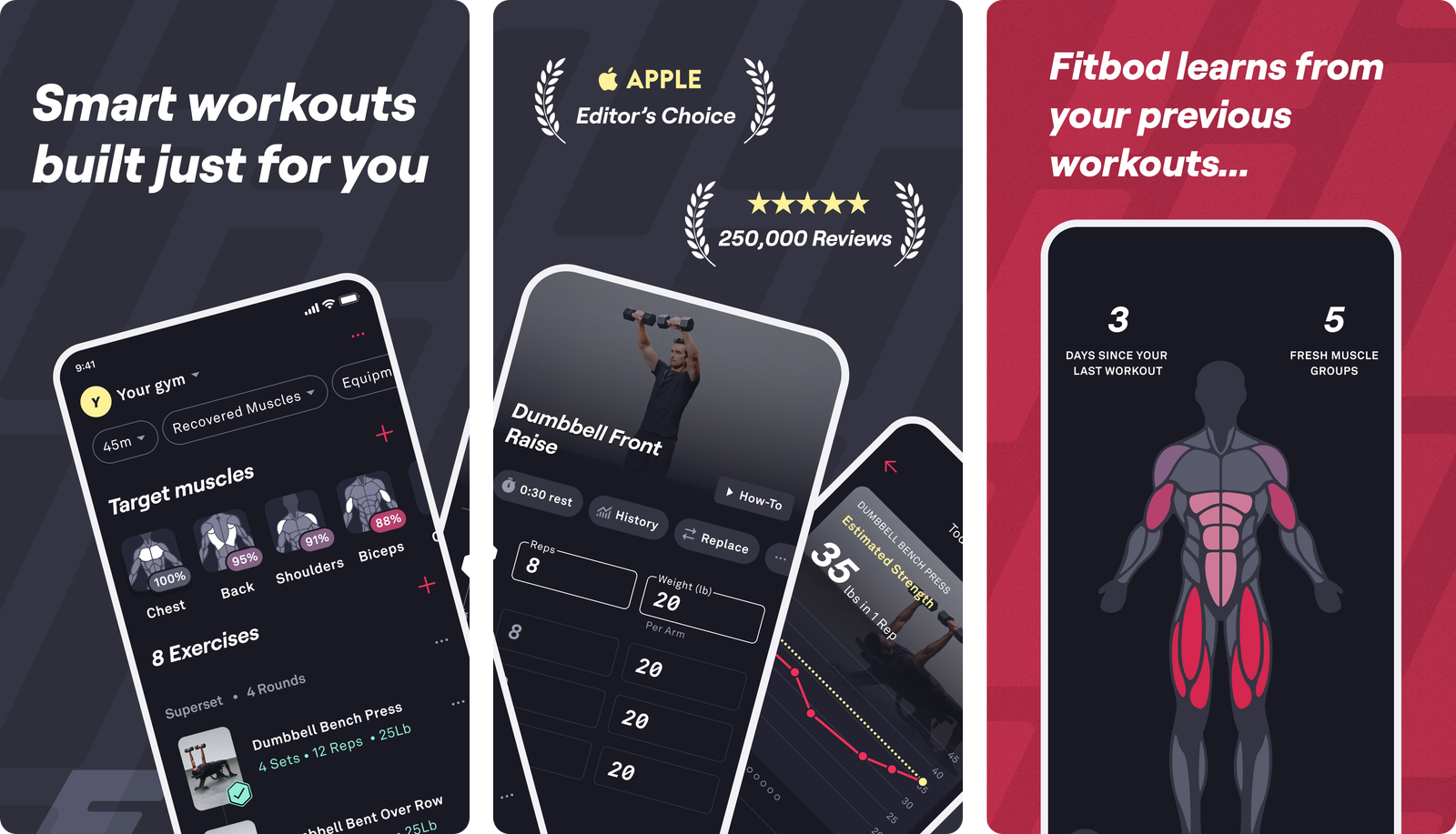
Fitbod's own muscle recovery documentation explains the model: each muscle group gets a recovery score from 0% to 100% based on the sets, reps and weight you logged, and muscles are treated as fully recovered after six days unless something else changes that. The App Store listing puts the exercise library at over 1,000 movements and shows a 4.8 rating from around 280,000 ratings.
The catch is the money. There is no permanent free plan. Fitbod's help centre states you get a seven-day trial, that you have to opt into a monthly or yearly plan to start it, and that the trial rolls into a paid subscription unless you cancel first.
Hevy: best for a free, fast log you own
Platform: iOS App Store, Android, Apple Watch, Wear OS, web · Price: Free tier, with Hevy Pro listed at $2.99 and $3.99 a month, $23.99 a year, or $74.99 lifetime.
The community logbook. You build the routines yourself and tap in sets, and Hevy has no opinion about your programming. What it adds instead is a feed where you follow friends and see their sessions, which for a lot of people is the accountability that makes logging stick.
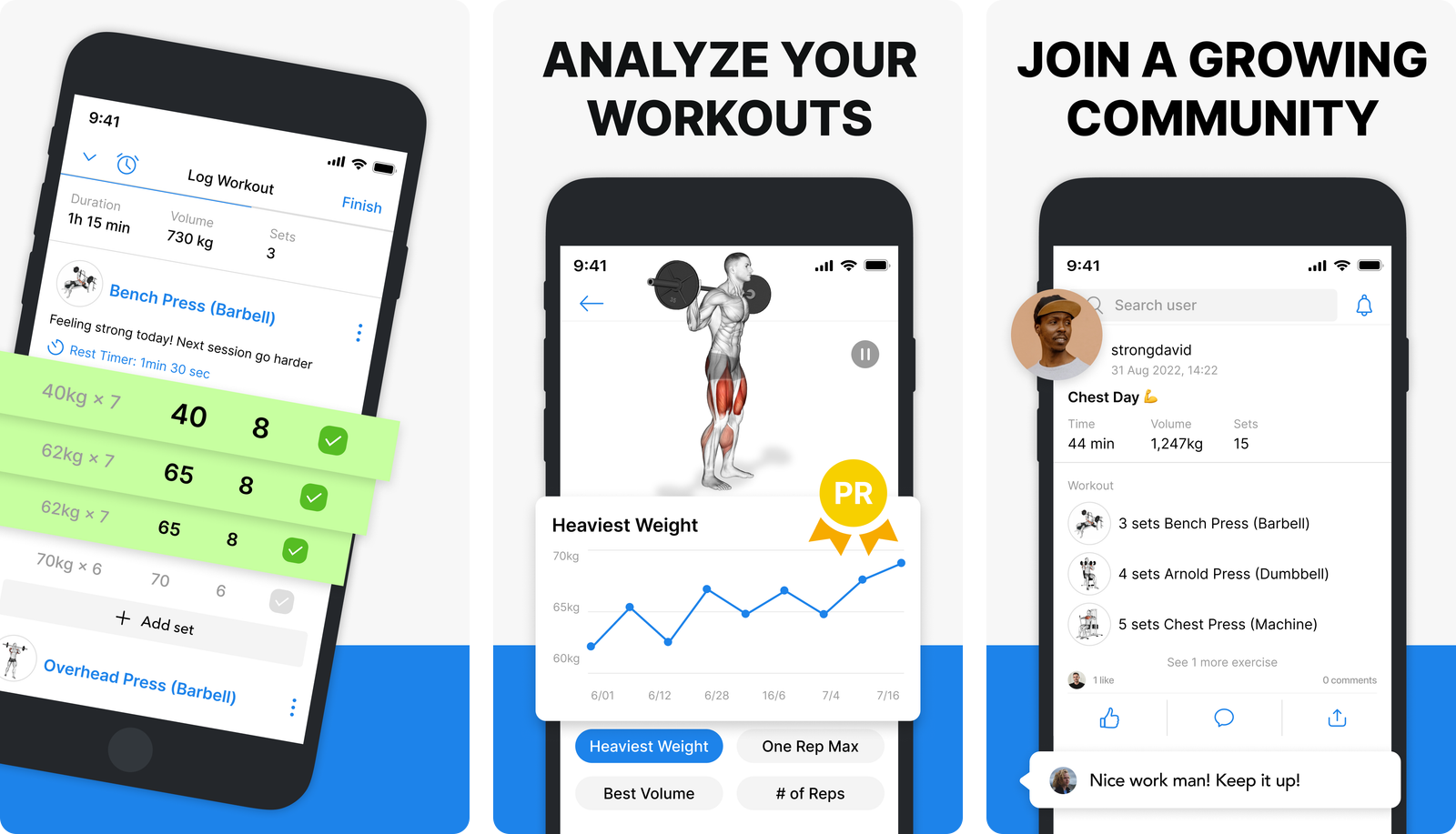
The free tier is the headline. Hevy publishes the exact limits: free accounts get 4 routines, 3 months of stats history and 7 custom exercises, while Pro removes all three caps and adds muscle distribution charts, a monthly report and a warm up calculator.
Four routines covers a push pull legs split or an upper lower with room spare. Three months of history is the limit most people hit first, and it is the honest reason to upgrade rather than a feature paywall. The exercise library runs to 400 or so movements with animations and per-exercise history, and the App Store listing shows a 4.9 rating from around 85,000 ratings.
How do Fitbod and Hevy compare feature by feature?
| Fitbod | Hevy | |
|---|---|---|
| Standout feature | Generates the session from your recovery data | Free tier that a real lifter can live in |
| Free tier | None, seven-day trial only | 4 routines, 3 months of stats, 7 custom exercises |
| Paid price (US App Store) | $12.99 to $15.99 a month, $79.99 to $95.99 a year | $2.99 to $3.99 a month, $23.99 a year, $74.99 lifetime |
| Who picks the exercises | Fitbod, from your equipment and recovery | You |
| Exercise database | Over 1,000 movements | Around 400, plus custom exercises |
| Programs and templates | Generated sessions, saved routines | Hand-built routines and a shared routine library |
| Social feed | No | Yes, following, likes and comments |
| Apple Watch | Companion app, iPhone starts and saves the workout | Standalone tracking, phone can stay in the locker |
| Data export | Not documented in the public help centre | Workouts and measurements export from settings |
Prices and features shift over time, so check the current listings before you commit to either one.
Two of those rows do most of the work. The price gap is roughly four to five times, and the export row decides whether you can ever leave.
Hevy documents its export plainly: Profile, Settings, Export and Import Data, then choose workouts or measurements. It also imports CSV files from the Strong app, which is why switching into Hevy is easy and switching out of most other apps is not. Fitbod's public help centre has no equivalent export article at the time of writing, so check inside the app before you build years of history there.
Apple Watch is not a tie
Hevy treats the watch as a real device. Its site says you can leave your phone in the locker room and run the whole session from an Apple Watch or Wear OS watch.
Fitbod's Apple Watch documentation is more honest about being a companion: you log sets, adjust reps and weight, and see the rest timer on the watch, but starting the workout, swapping an exercise mid-session and saving at the end all need the iPhone.
That split runs through most of the category, and it is worth checking before you commit: our roundup of workout apps for Apple Watch separates the standalone ones from the companions.
Which one is faster to log with?
Hevy, clearly, once your routines exist. Start routine, tap through the sets, finish. Fitbod asks you to accept or reshuffle a generated session first, which is a feature when you are undecided and friction when you are not.
But both apps share the same failure mode, and it is the reason so many lifters end up back in their notes app.
Tap-based logging assumes the session goes to plan. The rack is taken so you do leg press. You turn the last set into a drop set. You add two sets because you felt good.
In a structured app, every deviation is a negotiation with the interface: search the exercise, add it, reorder it, fix the set count. On paper it is one line of typing. That gap is the same one that shows up comparing Hevy and Strong, and a smarter algorithm does not close it.
Fitbod has a specific version of this problem. When you go off script, you are also teaching its recovery model something that may not be true, so the next generated session inherits your improvisation.
Which should you pick?
- Pick Fitbod if you do not want to program. Returning after a layoff, training around limited equipment, or genuinely unsure what to do on a Tuesday. Paying for the decision is a fair trade.
- Pick Hevy if you already have a plan. A free tier that holds four routines and three months of stats covers most lifters running a fixed split, and Pro is cheap when you outgrow it.
- Pick Hevy if data ownership matters. The documented export is worth more than any single feature.
- Pick Fitbod if variety keeps you consistent. Over 1,000 exercises and a rotating selection beats the same six lifts for some people.
- Pick neither if the app itself is the friction. Some lifters log fine on paper and stall the moment a routine screen appears.
If you want the wider field, we rank it in best workout tracking apps and cover the no-cost end in best free workout tracking apps.
What if both apps feel like too much app?
| Physical Notebook | Notes App | Fitbod or Hevy | Gym Note Plus | |
|---|---|---|---|---|
| Logging speed | Slow, needs a pen | Fast, free typing | Medium, tap per set | Fast, free typing |
| Handles an off-script session | Easily | Easily | Fiddly | Easily |
| Charts and personal records | None | None | Yes | Yes, from your text |
| Setup before your first session | None | None | Routines or onboarding | None |
| Searchable history | None | Text search only | Structured search | Structured search |
Some lifters do not want to build routines or answer onboarding questions. They want to write down what happened and leave.
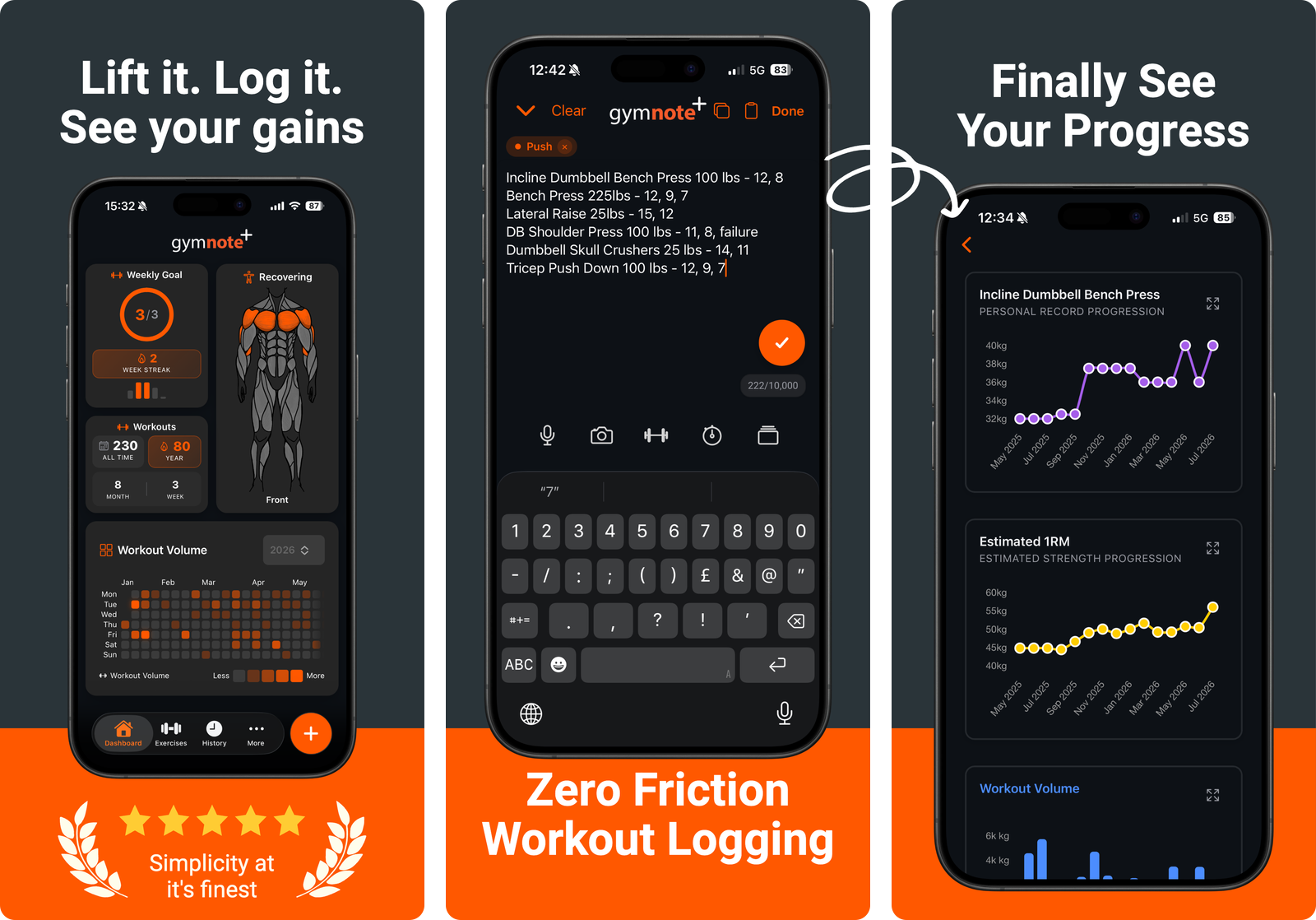
That is the gap Gym Note Plus fills. You type the session the way you already do in Apple Notes, and it reads the text into per-exercise charts, estimated one rep maxes and personal records, without a single template.
How to test all three in one week
- Export whatever you already have. If you are in Hevy, pull the CSV now so the decision is reversible.
- Run Fitbod's trial on a real week, not a curious afternoon. Its whole value is the second and third session, once the recovery model has data.
- Set up one Hevy routine for your most common day and log it twice. Four free routines is enough to judge the whole app.
- Paste a real session into a parser. Drop your last workout into the free notes to workout translator and see whether plain text gets you the same charts.
- Pick on friction, not features. Whichever one you opened without thinking about it on day five is your answer.
If the sticking point is the plan rather than the app, get a free private link to the workout plan optimizer and check what your current week actually trains before you pay anyone to redesign it.
The best workout tracker is the one still on your phone in six months. For a lot of lifters, that is not the one with the cleverest algorithm.
Frequently Asked Questions
Is Fitbod better than Hevy?
Neither is better outright, because they solve different problems. Fitbod generates workouts from your logged history and per-muscle recovery, so it suits lifters without a program. Hevy records workouts you plan yourself and adds a social feed. If you already know your split, Hevy does the job for far less money.
Is Hevy free and is Fitbod free?
Hevy has a permanent free tier covering 4 routines, 3 months of stats history and 7 custom exercises, with Hevy Pro from $2.99 a month on the US App Store. Fitbod has no free tier. Its help centre describes a seven-day trial that requires opting into a plan and converts to a paid subscription automatically.
Can you export your data from Fitbod and Hevy?
Hevy documents an export in its help centre under Profile, Settings, Export and Import Data, covering workouts and measurements, and it imports CSV files from the Strong app. Fitbod's public help centre has no export article at the time of writing, so confirm inside the app's settings before you build years of training history in it.
Does Fitbod or Hevy work better on Apple Watch?
Hevy supports standalone Apple Watch and Wear OS tracking, so you can leave the phone in the locker room. Fitbod's Apple Watch app is a companion: it logs sets, adjusts weight and shows the rest timer, but starting the workout, swapping exercises and saving the session all require the iPhone.
Which app has more exercises?
Fitbod's App Store listing advertises over 1,000 exercises, while Hevy documents a library of around 400 plus unlimited custom exercises on Pro. Database size matters less than it sounds, since most lifters use the same twenty or thirty movements. Custom exercise support matters more, and both apps have it.
What is the fastest way to log a workout?
Typing plain text is the fastest way to log a workout, because it needs no routines, no onboarding and no tap per set. The trade-off is that plain text produces no charts by itself. Apps that parse notes-style text, such as Gym Note Plus, keep the typing speed and add the progress tracking that Fitbod and Hevy provide.
Final Takeaways
- Fitbod sells decisions, Hevy sells a logbook. Work out which one you are short of before comparing feature lists.
- The price gap is real. Fitbod runs four to five times the cost of Hevy Pro on the US App Store, with no free tier underneath it.
- Hevy's free plan is usable, not a demo: 4 routines, 3 months of stats, 7 custom exercises.
- Check export before you commit. Hevy documents one, Fitbod does not publish one.
- Both punish an off-script session. If yours rarely goes to plan, plain-text logging may beat either app. We cover close substitutes in Hevy alternatives, Strong app alternatives and Fitbod alternatives.

Josh Ibbotson
Josh is the creator of Gym Note Plus, building tools that make workout tracking as simple as taking notes.
Ready to try it out?
Download Gym Note Plus and start tracking your workouts the way you want.
Download on App Store