
Using Apple Notes For Bodybuilding Workout Logs
Quick answer: To track progressive overload in Apple Notes, log every set as plain text (for example "Squat 315 x5 x3"), keep one note per session so you never overwrite history, and record RPE next to each lift. Then paste that text into a tool like Gym Note Plus to chart your volume and strength trends automatically.
To track progressive overload in notes app environments like Apple Notes means using simple, unstructured text to log your training volume and confirm you are getting stronger over time. It is the minimalist's secret weapon for avoiding the "app tax", the cognitive drain caused by fiddling with complex menus between heavy sets. But here is the thing: while typing is fast, actually seeing your progress in a sea of text is a nightmare.
You are probably here because you hate traditional gym apps. You know the ones. They force you into rigid dropdowns, show you ads for protein powder you do not want, and make it impossible to add a quick note about how your left knee felt on that third set. If you have been using Apple Notes for workout logs bodybuilding style, you already know the appeal, and the frustration. Research from the Health & Fitness Association (HFA) reveals that physical fitness memberships grew by a solid 5.6% in 2024, yet as the gym floor gets more crowded, our patience for clunky software is disappearing.
What is Progressive Overload Tracking?
At its core, progressive overload is the systematic increase of stress placed on your body during exercise. It is the only way to grow. As Collin Taylor, Performance Coach at T3 Performance, notes: "If the goal is to continue to gain strength, and you do the same movement pattern with the same amount of weight consistently over a long duration of time, eventually your body will adapt and that weight will no longer be challenging."
If you are not tracking, you are guessing. And guessing is the fastest way to hit a plateau that lasts for months. According to Grand View Research, the global fitness app market was estimated at $12.12 billion in 2025, but a huge chunk of lifters are rejecting these apps in favor of the "Notes App Gang." Why? Because when you are gasping for air after a set of deadlifts, you do not want to navigate a hierarchical UI. You want to type "405 3x5" and sit down.
Why lifters use a notes app:
- Zero Friction: No loading screens or dropdowns.
- Total Control: Write exactly how you want.
- Speed: Log your set in under three seconds.
- Context: Easy to add notes about injuries or energy levels.
The Anatomy of a Perfect Workout Note
Most people fail because their notes are a mess. A "wall of text" is useless for review. To make your data machine-readable and human-useful, a specific structure must be followed. The weight was lifted. Now it must be recorded properly.
According to Brad Schoenfeld, Ph.D., a leading hypertrophy researcher: "Understand that strength training is not simply the act of lifting a weight from Point A to Point B. Rather, you must concentrate on the target muscle(s) that you're working and channel your efforts into making those muscles exert the required force to execute the lift."
To capture this intensity, your apple notes workout log should include:
- The Date & Routine Name: Keep it at the top.
- Exercise Name: Use consistent naming (e.g., always "High Bar Squat").
- The Data String: -Weight- x -Reps- x -Sets-.
- RPE/RIR: How hard was it on a scale of 1-10? This is called autoregulation.
- Qualitative Cues: "Shoulders back," or "Last rep was a grinder."
Example of a clean log:
Bench Press: 225x5, 225x5, 230x4 (RPE 9) - felt strong today
If notation like "3x5-8" or "RPE 9" looks unfamiliar, our workout shorthand guide breaks down exactly what each part means, and our rep ranges explained article covers how to pick and progress within a range.
Why Using Apple Notes for Workout Logs Bodybuilding Style Usually Fails Long-Term
There is a dark side to the minimalist approach. Most lifters eventually suffer from "Data Amnesia." This happens when you have six months of logs but have no idea if your bench press actually went up or if you just got better at grinding out ugly reps.
Common community habits often destroy data integrity. On Reddit's r/AppleNotesGang, users often admit to the "overwriting dilemma." They create one note for the week and simply overwrite last week's numbers with the new ones. It feels productive in the moment (it is satisfying to delete a lower number), but you are effectively burning your history.
Without history, you cannot see macro-trends. You cannot see that your progress stalled three weeks ago. Data from Business of Apps (2026) shows that fitness app revenue hit $3.4 billion because people are desperate for insights that raw text simply cannot provide. The speed of the notes app is bought at the cost of the analytical power of a progressive overload tracker.
| Feature | Traditional Gym Apps | Apple Notes (Manual) |
|---|---|---|
| Logging Speed | Slow (Menus/Sliders) | Instant (Typing) |
| Flexibility | Rigid | Total |
| Charts/Graphs | Automatic | Non-existent |
| Historical Review | Easy | Manual scrolling |
| Cognitive Load | High | Low |
How to Organize Your Notes App for Easier Reviews
If you are committed to the manual life, you need a system. Do not just have one long note. That is a recipe for disaster. Instead, a folder-based architecture should be implemented.
- Folder 1: Active Mesocycle. Keep your current 4-8 week block here. One note per workout.
- Folder 2: Archive. Move completed blocks here. Never delete them.
- Naming Convention:
Year-Month-Day - Routine, for example2026-03-13 - Push A.
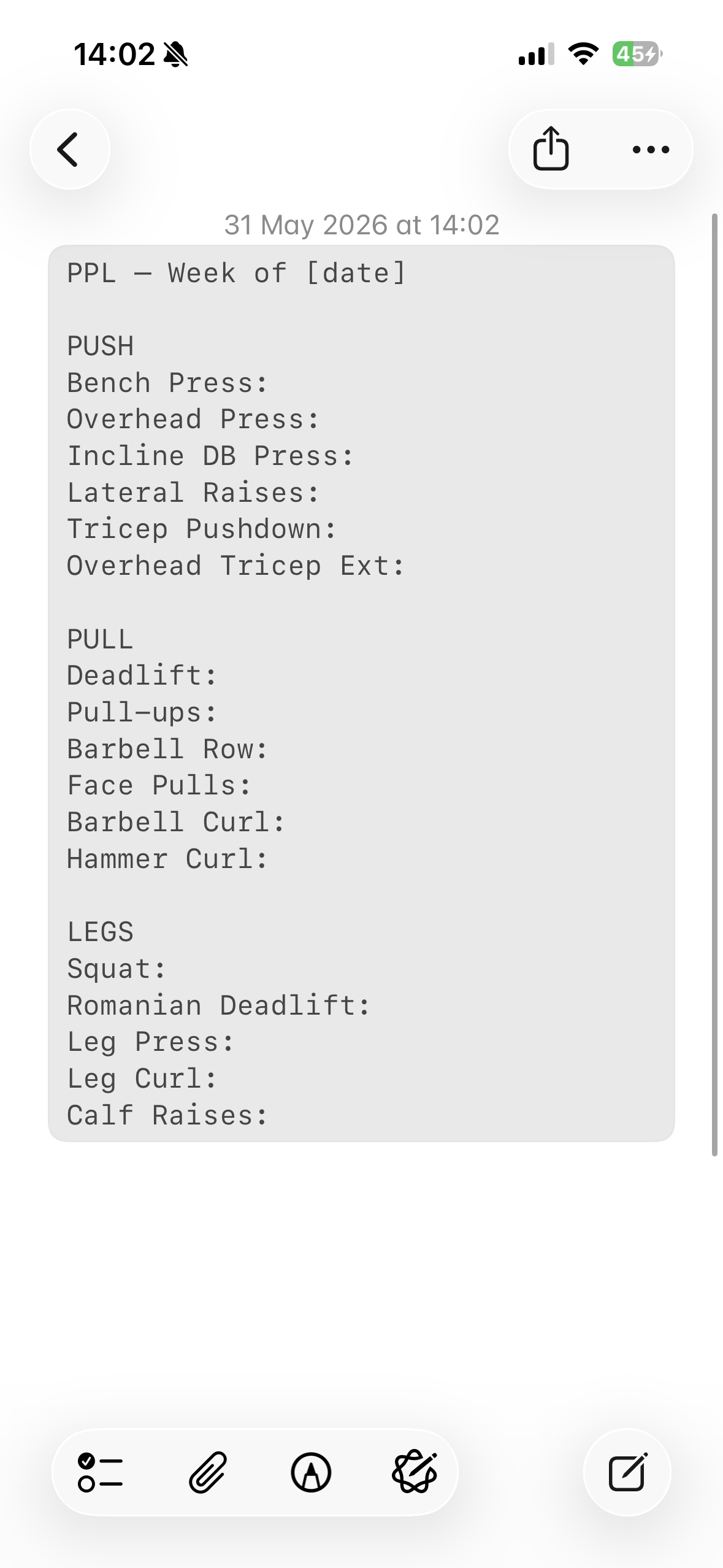
If you want a ready-made starting point, our Apple Notes workout template has copy-paste layouts for Push/Pull/Legs, Upper/Lower, and Full Body.
This structure allows for faster retrieval. But even with the best folders, you are still doing manual labor. Research from Circana (2025) highlights that consumer spending on fitness tracking grew by 88% year-over-year. People want the data. They just don't want the work. If you find yourself spending 20 minutes every Sunday morning transcribing your notes into an Excel sheet just to see a line graph, you are paying the "manual tax."
The Missing Link: Turning Raw Text into Progress Charts
We have established that the notes app is the fastest way to log. We have also established that it is the worst way to analyze data. For years, there was no middle ground. You either suffered through a clunky app or lived in the data dark ages.
The landscape evolved. Artificial intelligence can now read your messy shorthand. It understands that "Squat 315 3x5" means you did 4,725 lbs of total volume. This is the bridge lifters have been waiting for, and our guide on turning iPhone gym notes into progress charts walks through the whole process. Anyone who has been using Apple Notes for workout logs bodybuilding programs knows the pain of scrolling through weeks of raw text trying to figure out if their squat actually went up. AI parsing eliminates that entirely.
According to the American College of Sports Medicine (2025), over 345 million people used fitness apps last year. Many of those users are likely looking for a way to get the benefits of a database without the friction of an interface. The goal is to keep writing workouts exactly how you always have, while having the math done for you in the background. If you want to see that translation happen with your own log, paste a session into the free notes to workout translator and it becomes structured sets and charts in seconds.
How Gym Note Plus Bridges the Gap for Notes App Purists
One option that takes a different approach to this problem is Gym Note Plus. It was built for people who refuse to leave their notes app but still want to see if they are actually getting stronger.
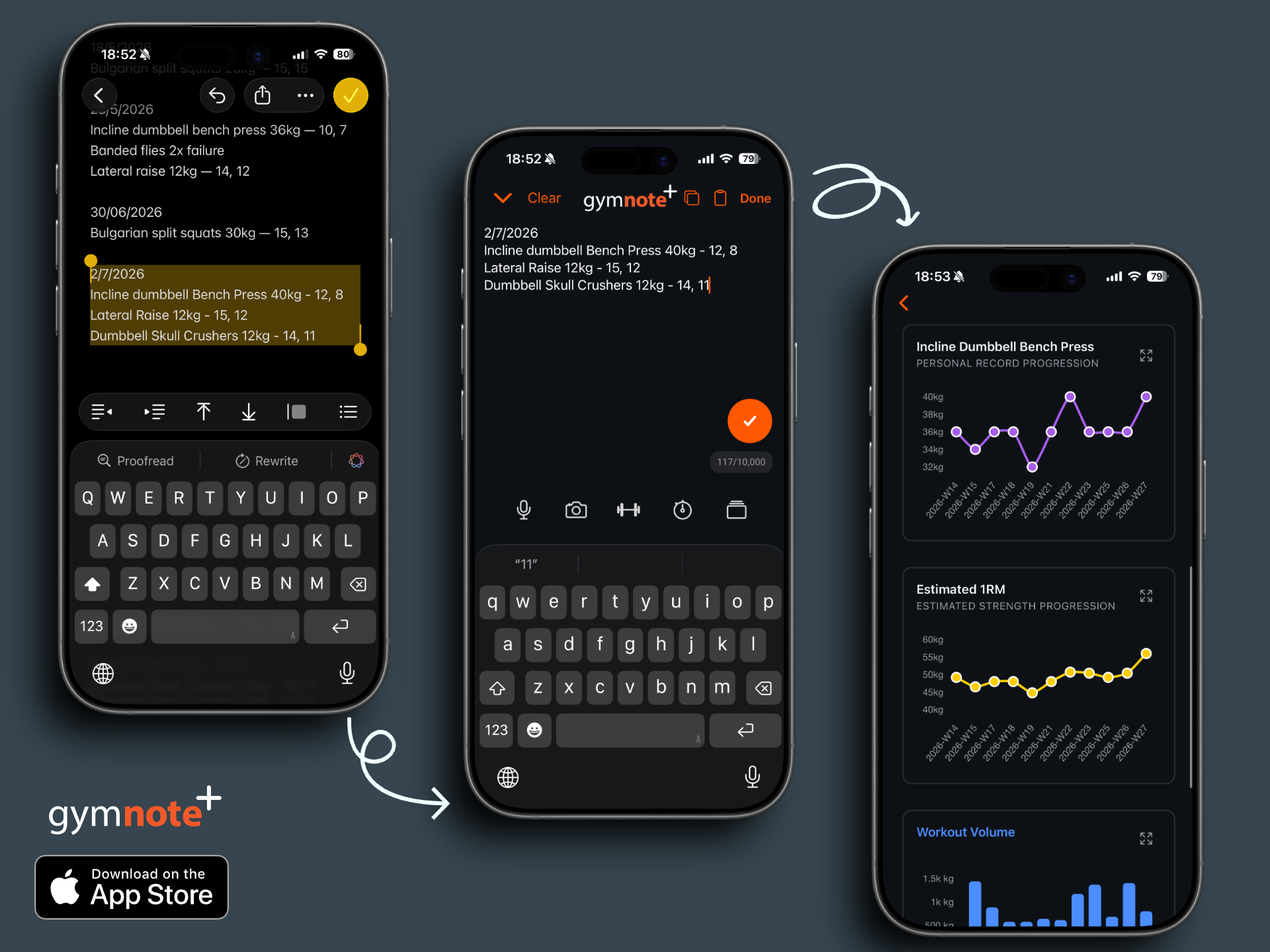
Instead of making you fill out forms, you just copy your raw text from Apple Notes and paste it into the tool. It acts as a translation layer. It automatically identifies your exercises, extracts the weight and reps, and builds your progress charts instantly. It is essentially a gym notes template that thinks for itself.
Why it works for minimalist lifters:
- No Menus: You never touch a dropdown during your workout.
- Historical Preservation: Your raw notes stay in Apple Notes, but your data is structured in Gym Note Plus.
- Volume Tracking: It calculates your session tonnage and 1RM (one-rep max) trajectories automatically.
- Stay Out of the Way: It follows the philosophy of "seconds, not minutes."
Life Time's 2025 wellness poll found that 99.3% of people feel happier after logging a workout. That happiness is often dampened when the logging process itself is a chore. By using a tool that transforms natural language into structured data, you keep that post-workout high without the administrative headache.
Frequently Asked Questions
What does 3x5-8 mean in a workout?
"3x5-8" means three sets of somewhere between five and eight reps each. The first number is the set count and the range after it is your target rep window. If you hit the top of the range (three sets of eight) with clean form, that is your cue to add weight next session. It is a common way to program hypertrophy work.
How do you log bodybuilding workouts in Apple Notes?
Create one note per session with the date and routine name at the top, then list each exercise on its own line as "Exercise: weight x reps x sets". Add RPE or a short cue where it helps, for example "Incline DB press: 70x8, 70x8, 70x7 (RPE 9)". Keep naming consistent so the log stays easy to scan and parse.
Is Apple Notes good for tracking progressive overload?
Apple Notes is excellent for capturing progressive overload quickly because you can type a set in under three seconds with no menus. Its weakness is review: it cannot chart whether your weights are trending up. Most lifters keep logging in Apple Notes, then paste the text into a tool like Gym Note Plus to see the trend lines.
How do I stop losing my workout history in Apple Notes?
Never overwrite an old note. Create a new note for every session and move finished training blocks into an archive folder instead of deleting them. Use a naming convention like "2026-07-16 Push A" so entries sort by date. Preserving every session is what lets you compare today against months ago.
Final Takeaways for the Notes App Gym Logger
If you want to track progressive overload in notes app folders successfully in 2026, stop trying to turn a text editor into a database. Use the notes app for what it is good at: fast, messy, stream-of-consciousness logging. Use it to record that your "right shoulder felt impinged" or that you "took a 5-minute rest because the gym was packed."
But do not let that data die there. Whether you have been using Apple Notes for workout logs bodybuilding routines or powerlifting cycles, the historical context of your training is too valuable to lose to "data amnesia."
Next Steps to Optimize Your Training:
- Standardize your syntax. Pick a format like
Exercise: Weight x Reps x Setsand stick to it. - Stop overwriting. Create a new note for every session to preserve your history.
- Audit your progress monthly. If you are not seeing an upward trend in your charts, it is time to change your program.
- Use a hybrid approach. Keep the speed of note-taking but use a parser like Gym Note Plus to handle the analytics.
Your training should be hard. Your tracking should be easy. By leveraging the simplicity of Apple Notes with the power of modern parsing, you get the best of both worlds. Now go hit that PR.

Josh Ibbotson
Josh is the creator of Gym Note Plus, building tools that make workout tracking as simple as taking notes.
Ready to try it out?
Download Gym Note Plus and start tracking your workouts the way you want.
Download on App Store