
The Best Apple Notes Workout Template (Free Copy-Paste Splits)
Quick answer: An Apple Notes workout template is a reusable plain-text layout you keep pinned in the Notes app and fill in set by set. Copy one of the templates below into a new note, duplicate it each week into a dated copy, and type your numbers next to each exercise.
An Apple Notes workout template is a reusable, plain-text layout you keep in the Notes app and fill in set-by-set during a session. It gives you the structure of a programmed routine without the friction of a dropdown-driven gym app. You pin one note, duplicate it each week, and type your numbers straight into it. No accounts, no loading screens, no tapping through three menus to log a warm-up set.
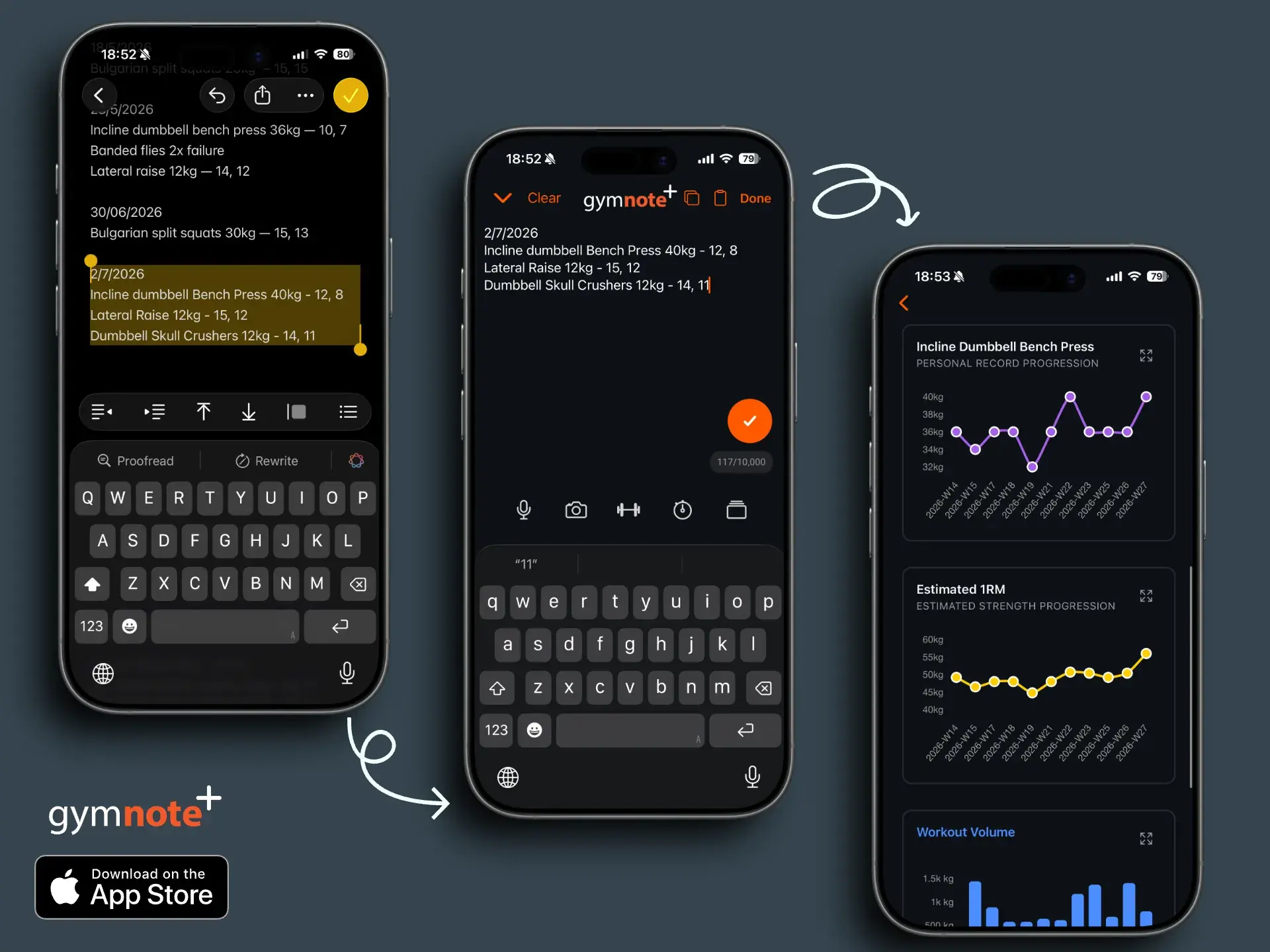
The catch most lifters run into is the same one that makes Notes great in the first place: it's just text. Six months of "Bench 185 3x5" sitting in iCloud is a goldmine of progress data, but it's invisible until you do something with it. This guide gives you ready-to-use templates you can paste into Apple Notes today, plus a syntax that keeps logging fast and makes that text easy to turn into charts later with Gym Note Plus.
Why Apple Notes Beats a "Real" Workout App for Templates
The whole point of a template is to remove decisions while you're under the bar. Apple Notes does this better than most dedicated apps because it gets out of your way:
- Zero setup: A template is just a note. Type it once, pin it, done.
- Syncs everywhere: iCloud keeps the same note on your iPhone, iPad, and Mac, so you can plan on the couch and log in the gym.
- Infinitely flexible: You can scribble "shoulder twinge, dropped to 155" mid-set without fighting a form that has no field for it.
- Genuinely fast: Filling in a number next to an exercise name takes about three seconds.
The trade-off is that Notes won't graph your volume or flag a stalled lift. That's fine, you can keep the speed and add the analysis afterwards. More on that below.
If you're not tied to Apple's apps, the same layouts drop straight into an Evernote workout template or a Google Docs workout template, and a GoodNotes workout template does the same job if you'd rather handwrite on an iPad. On Android, the Samsung Notes workout template is the closest equivalent.
TL;DR
- Pick a template, paste it into a new note, pin it.
- Duplicate the note each week and fill in your numbers.
- Keep a consistent shorthand so the data stays clean.
- Paste your week of notes into Gym Note Plus to get charts, PRs, and trends automatically.
What Makes a Good Apple Notes Template
A good template does three things: lists your exercises in order, leaves space for the numbers, and uses a format you'll actually stick to. (For a deeper breakdown of which fields are worth recording every session, see our workout log template guide.) The single biggest mistake is being inconsistent: writing "BP" one day and "Bench Press" the next, or logging "3x5 @ 185" today and "185x5x5x5" tomorrow. Pick one style and keep it.
Here's the format that works best, because it reads naturally to you and parses cleanly later:
| What you type | What it means |
|---|---|
Bench 185 3x5 | 185 lb, 3 sets of 5 reps |
Squat: 135x5, 185x5, 225x5 | Three sets at increasing weight |
RDL 4x10 @ 100 | 4 sets of 10 reps at 100 lb |
Pull-ups BWx8, BWx8, BWx6 | Bodyweight, three sets |
Plank 3x60s | Timed: 3 sets of 60 seconds |
Run 5km 24:30 | Distance and duration |
You don't have to memorise any of this. The point is just to stay consistent with yourself. Whatever style you choose, use it every session. If you are still deciding what belongs in the note at all, our guide to workout notes covers the five essentials plus the comments worth keeping.
Template 1: Push / Pull / Legs (PPL)
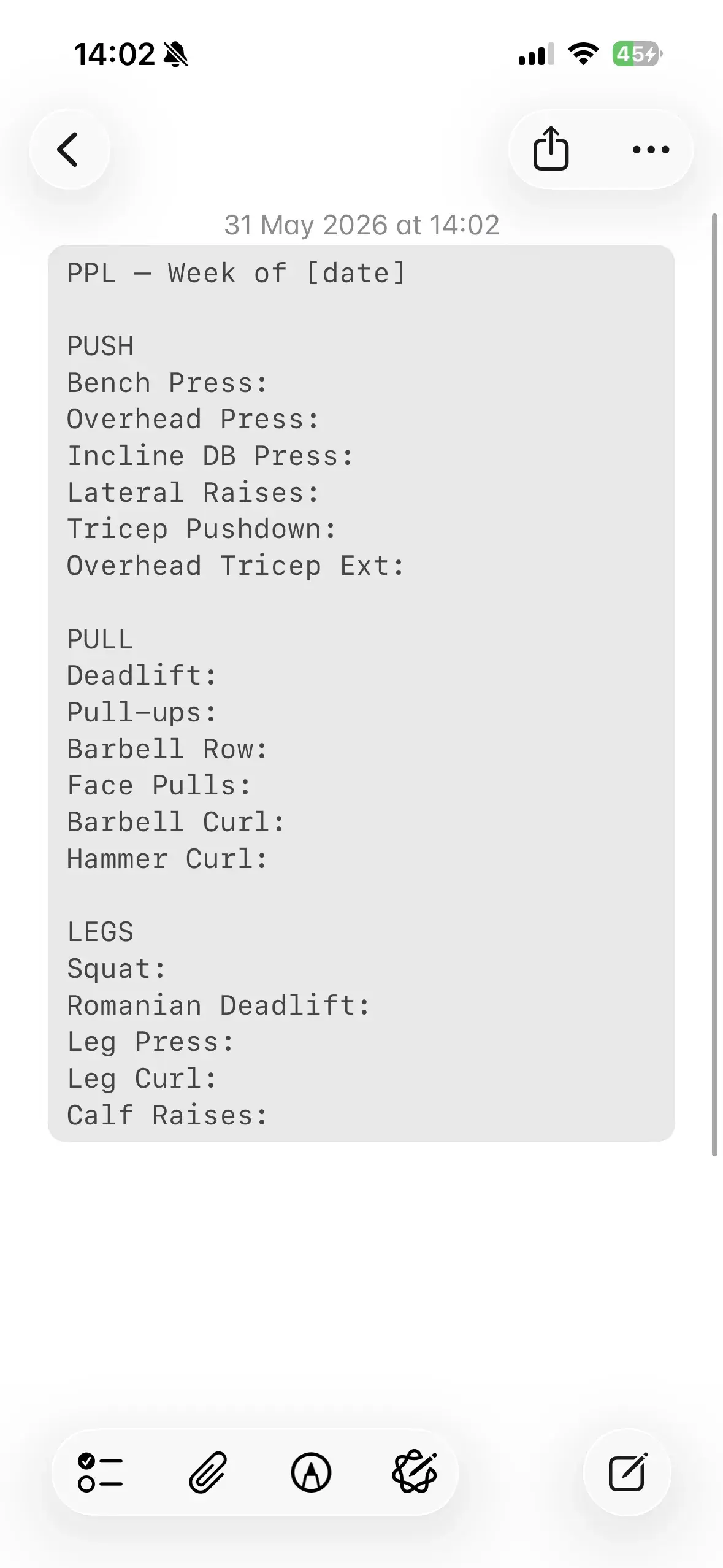
The most popular intermediate split for a reason: it hits every muscle group with enough frequency and volume to keep progressing, and it scales from 3 to 6 days a week. Copy the block below into a note:
PPL: Week of [date]

PUSH
Bench Press:
Overhead Press:
Incline DB Press:
Lateral Raises:
Tricep Pushdown:
Overhead Tricep Ext:

PULL
Deadlift:
Pull-ups:
Barbell Row:
Face Pulls:
Barbell Curl:
Hammer Curl:

LEGS
Squat:
Romanian Deadlift:
Leg Press:
Leg Curl:
Calf Raises:
Filled in, a Push day looks like this:
PUSH
Bench Press: 135x5, 155x5, 185x5x3
Overhead Press: 95 3x8
Incline DB Press: 60 3x10
Lateral Raises: 20 4x15
Tricep Pushdown: 50 3x12
Overhead Tricep Ext: 25 3x12
Run each day twice a week for a 6-day rotation, or once each for a 3-day version. If you run this split, our guide to the fastest way to log PPL workouts shows the shorthand that keeps each set to about three seconds.
Template 2: Upper / Lower
Better if you can only train four days a week, or if you recover better from higher per-session frequency on the big lifts.
UPPER / LOWER: Week of [date]

UPPER
Bench Press:
Barbell Row:
Overhead Press:
Pull-ups:
Incline DB Press:
Barbell Curl:
Tricep Pushdown:

LOWER
Squat:
Romanian Deadlift:
Leg Press:
Leg Curl:
Calf Raises:
Hanging Leg Raise:
Alternate Upper / Lower / Upper / Lower across the week.
Template 3: Full Body (3 Days)
The most time-efficient option, and ideal for beginners or anyone short on training days. Three sessions, each a little different so you're not benching three times in a row.
FULL BODY: Week of [date]

DAY A
Squat:
Bench Press:
Barbell Row:
Overhead Press:
Barbell Curl:

DAY B
Deadlift:
Incline DB Press:
Pull-ups:
Leg Press:
Tricep Pushdown:

DAY C
Front Squat:
Overhead Press:
Lat Pulldown:
Romanian Deadlift:
Lateral Raises:
Setting It Up in Apple Notes
The mechanics matter as much as the template. Here's how to make it stick:
- Create one master note with your chosen template and title it clearly (e.g. "PPL Template").
- Pin it so it sits at the top of your list. Swipe right on the note and tap the pin.
- Each week, duplicate it. Long-press the note → Copy, then paste into a new note titled with the date. You're logging into a fresh copy, never overwriting last week's numbers.
- Fill it in live. Type your numbers next to each exercise between sets.
- Keep a folder called "Workouts" so your history stays in one place.
That last point is the one people skip and regret. The most common way lifters lose months of data is the "overwrite trap": editing the same single note every session so today's numbers replace last week's. Always work in a dated copy. Your past workouts are the blueprint for your next ones. And before you pin that master note, paste the finished template into the free workout plan optimizer to check it covers every muscle with enough weekly sets.
| Approach | Speed | Keeps History | Easy to Analyse |
|---|---|---|---|
| Editing one note forever | Fast | No | No |
| New dated note each week | Fast | Yes | Manually |
| Dated notes + Gym Note Plus | Fast | Yes | Automatic |
Turning Your Template Into Trackable Data
This is where the plain-text approach pays off. Because your notes are written in natural shorthand, you don't have to choose between Apple Notes' speed and a real app's analytics. You can have both.
Gym Note Plus reads your messy notes the way a training partner would. At the end of a session or the end of the week, you copy your text out of Apple Notes, paste it in, and it identifies the exercises, weights, reps, sets, and dates automatically. No forms, no dropdowns. Want to see it work before installing anything? Drop a few lines from your template into the free notes to workout translator. From there you get:
- Volume and 1RM trends per exercise, so you can see whether you're actually progressing or quietly plateauing.
- Automatic PRs flagged as you log them.
- Exercise aliasing, so "BP", "Bench", and "Bench Press" all map to the same lift even if your shorthand drifts.
- Support for every set type in your template: strength sets, timed holds like
Plank 3x60s, and cardio likeRun 5km 24:30are all parsed correctly.
The app keeps templates of its own too, so once your shorthand is in there you can use workout templates in Gym Note Plus instead of retyping the exercise list into a fresh note every week.
There's a second, underrated benefit: legacy data. If you already have months or years of workouts sitting in Apple Notes, you can paste that history in and have it parsed in seconds: progress you've already made, finally visible, without hours of manual spreadsheet entry. Our guide on turning iPhone gym notes into progress charts covers that whole workflow step by step.
Key Takeaways
- A template removes decisions under the bar. List exercises in order, leave space for numbers, pin the note.
- Be consistent with your shorthand. One style, every session. That's what keeps the data clean.
- Never overwrite. Duplicate into a dated note each week so your history survives.
- Don't choose between speed and analysis. Keep logging in Apple Notes, then let Gym Note Plus turn that text into charts and PRs.
Your shorthand is already smarter than you think. Pick a template above, paste it into Notes, and the next time you want to see your progress, it'll be one copy-paste away.

Josh Ibbotson
Josh is the creator of Gym Note Plus, building tools that make workout tracking as simple as taking notes.
Ready to try it out?
Download Gym Note Plus and start tracking your workouts the way you want.
Download on App Store